Run the trading engine
The oneshot backtest is fast but simplified. The trading
engine, cjtrade, runs strategies as they run live: minute by minute, on
ArenaX's clock, with real order matching. This page replays a week of
1-minute bars for one stock offline and walks through the report.
What the engine does
 cjtrade (main process)
   ├─ holds the one broker connection and the risk gate
   ├─ every minute: sends each bot the newest closed bar
   ├─ waits until every bot has answered, then steps to the next minute
   └─ bots (one process each, one symbol each)
        Bot_B on 2357  ── buy / sell / hold ──▶ main process ──▶ ArenaX
- Each strategy runs as a bot in its own process, on one symbol.
- Bots never talk to the broker. They answer the main process, which checks each order against the risk gate (per-bot capital budget, at most 3 orders per bar, a stop at a 25% account drawdown) before sending it.
- The engine waits for every bot before advancing, so a replay produces the same orders on every run, at any speed.
The set of bots is BOT_ROSTER in
src/cjtrade/apps/CJTrade/main.py.
The default is one bot, Bot_B, trading 2357 (ASUS) with an ADX regime
strategy. To replace it with your own file, see
Run your own strategy.
Step 1: download the prices
Fetch three weeks of 1-minute bars for 2357 into a file. This is the only step that needs the network:
uv run preload-prices --price-db prices.db --symbols 2357 --start 2026-11-02 --end 2026-11-21 --interval 1m,1d
The window must fall within the last 30 days, the limit of Yahoo Finance, the free minute-bar source.
Expected output:
2357 1m: 3639 bars over 15 days (2026-11-02 09:01 .. 2026-11-20 13:25)
2357 1d: 15 bars over 15 days (2026-11-02 09:00 .. 2026-11-20 09:00)
3654 bars in prices.db
Step 2: start ArenaX on that file
In a separate terminal:
CJTRADE_OFFLINE=1 AX_INITIAL_BALANCE=1000000 uv run arenaxd --backend=backtest --data=offline --price-db=prices.db
| Part | Meaning |
|---|---|
CJTRADE_OFFLINE=1 |
no network; any download attempt fails |
AX_INITIAL_BALANCE=1000000 |
simulated account starts with NT$1,000,000 (default 100,000) |
--backend=backtest |
replay mode; listens on port 8802, which the engine expects |
--data=offline --price-db=prices.db |
read prices only from the file |
Wait for sim env started (about 20 seconds). A preceding
no fetchable history found in 30 attempts line is expected: the server
cannot pick a start day on its own and waits for the engine to set it.
Step 3: run the engine
In a second terminal:
uv run cjtrade --broker=arenax --mode=backtest --watch-list=2357 --fund=1000000 --days=5 --start-date=2026-11-03 --speed=0
| Option | Meaning |
|---|---|
--broker=arenax |
trade on ArenaX |
--mode=backtest |
connect to the backtest server on port 8802 (demo is 8801, paper 8803) |
--watch-list=2357 |
symbols to feed; every bot's symbol must be listed |
--fund=1000000 |
capital the bots size orders against |
--days=5 |
number of days to replay |
--start-date=2026-11-03 |
first day; omit for a random day |
--speed=0 |
unpaced; 60 is one market minute per wall-clock second |
Leave options out to be asked
The engine prompts in the terminal for any omitted option, with defaults pre-filled, and remembers the answers for the next run.
Expected output (shortened):
[INFO][...] engine: broker=arenax backend=backtest clock=replay symbols=2357 fund=1000000 days=5
[INFO][...] engine.clock: replay: 961 bars, 2026-11-03 09:01:00 .. 2026-11-06 13:25:00, flat out (no pacing)
[INFO][...] engine: spawned Bot_B (bot_b.py, 2357)
[INFO][...] bot.Bot_B: started (2357) strategy=ADX_Adaptive
[INFO][...] engine: @2026-11-03 09:34 FILLED BUY 2357 x218/218 px=915.0 for Bot_B (resolved on refresh) balance=800246
[INFO][...] engine: @2026-11-03 10:04 FILLED SELL 2357 x218/218 px=908.0 for Bot_B (resolved on refresh) balance=997314
...
[INFO][...] engine: replay done: 960 bars in 12.6s (76 bars/s)
==================================================
  Backtest Summary
==================================================
  PnL (Total)  :      -76,768.08  (-7.68%)
  Total fills  : 13
  Max drawdown : -7.21%
  Round trips  : 9  (win 0 / loss 9,  win rate 0.0%)
  ...
[INFO][...] engine.report: result saved: .../reports/engine_be329ab8.pkl
HTML saved -> .../reports/engine_be329ab8.html
Notes:
replay: 961 barsis four trading days of 1-minute bars.--days=5counts calendar days (3 to 7 November), and the 7th is a Saturday.@2026-11-03 09:34is the event's market time; the bracketed field at the start of the line is wall-clock time.FILLED BUY 2357 x218/218 px=915.0: 218 of 218 shares filled at 915.- The summary has the same lines as the oneshot report. This run lost money; the default bot did not suit that week.
- The result is saved as a
.pklfile and an HTML report; both paths are printed.
During a run, status (bots, positions, recent orders) is served at http://127.0.0.1:8898/status.
Stop the ArenaX server with Ctrl+C when done.
Step 4: look into a run with insight
insight joins a run's result with the prices for the same period and
writes a diagnostic report:
uv run insight --list      # every run on this machine
uv run insight             # the most recent one
Expected output:
1 run(s) in .../reports:
  be329ab8                                 engine   2026-11-27 15:21     40,893 bytes

Run be329ab8 — 13 fill(s), 9 round trip(s), net -76,768.08
  Sharpe -10.754 · Sortino -10.147 · CAGR -99.81% · max drawdown -7.21%
  report  .../reports/engine_be329ab8.insight.md
  json    .../reports/engine_be329ab8.insight.json
The .insight.md file has the full write-up. Annualised figures such as
CAGR are not meaningful over a run this short.
Run your own strategy
To run a strategy file from Write a strategy as a bot, list it
in a roster file, roster.json:
[
  {"bot_id": "Bot_U", "script": "bot_custom.py", "symbol": "2357",
   "extra": ["/absolute/path/to/my_strategy.py"]}
]
bot_id: any name; it appears in the logs.script:bot_custom.py, the bot that runs a strategy file.symbol: the traded stock; it must also be in--watch-list.extra: the absolute path of the strategy file.
Then add --roster=roster.json to the command in step 3.
Other modes
--mode |
ArenaX started with | Clock |
|---|---|---|
backtest |
uv run arenaxd --backend=backtest |
replays a chosen period, paced by --speed |
demo |
uv run arenaxd |
the demo server's own accelerated clock |
paper |
uv run arenaxd --backend=paper |
real clock, during market hours, live Sinopac prices |
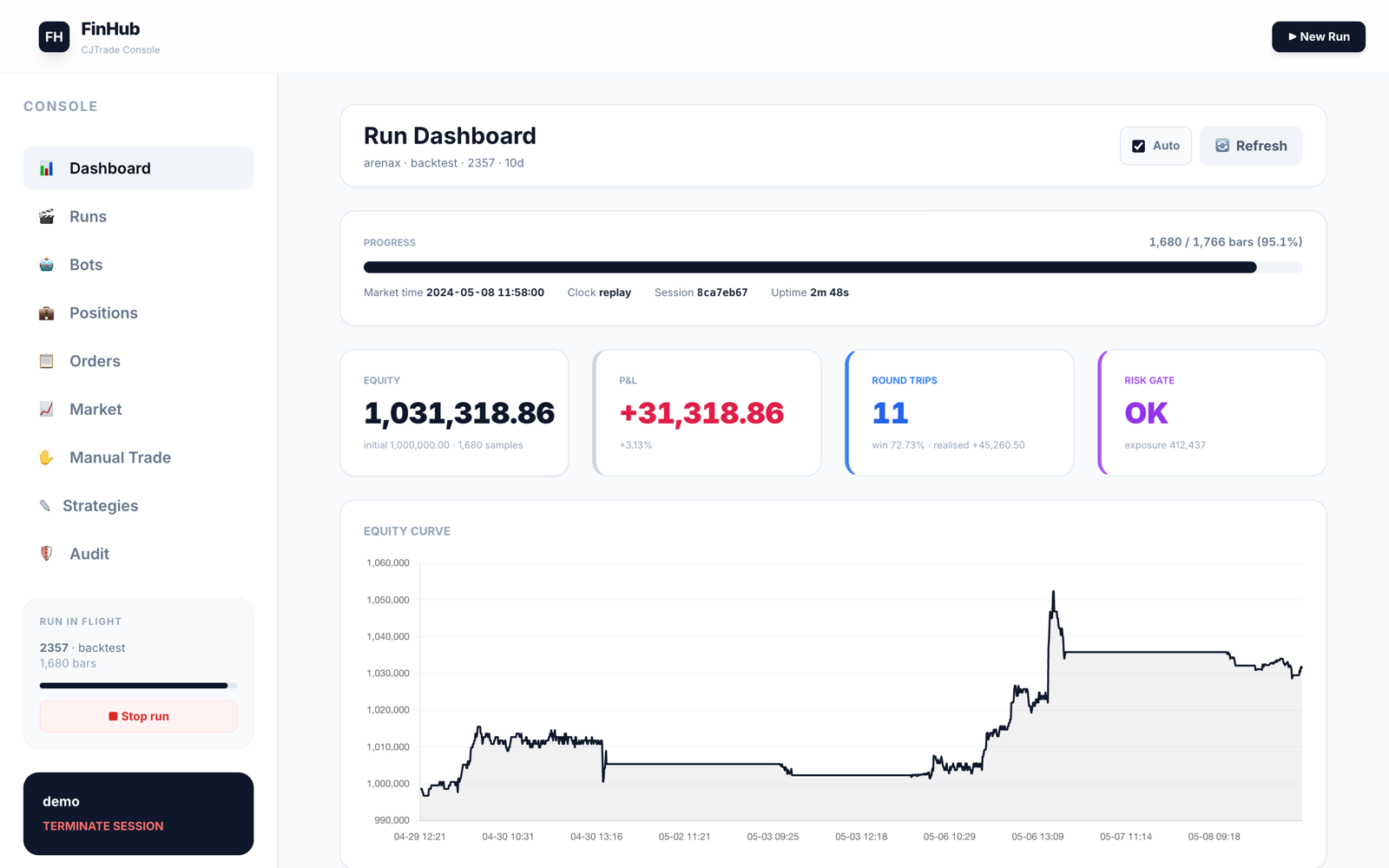
The FinHub web UI starts ArenaX and the engine and shows the same run in a browser:
Next: CJShell and FinHub.